Home
Free trials
Products
Flood 2
Flexify 2
Melancholytron
India Ink
LunarCell
SuperBladePro
SolarCell
Glitterato
Mr Contrast
Aetherize
Hue and Cry
Freebies
Older
Purchase
Support
When you download a plug-in from the
free trials page
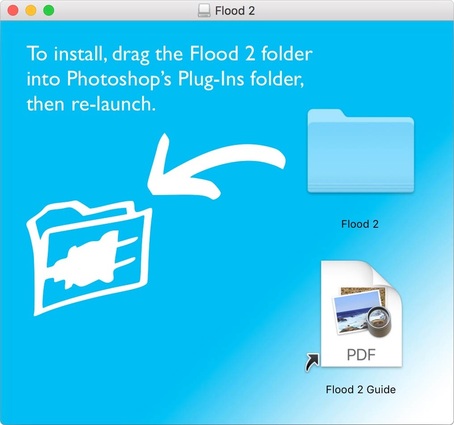
it arrives as a .dmg file.
In the Finder, double-click on the .dmg file. It will open as a window on the desktop.
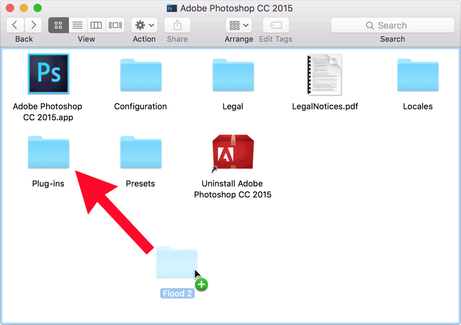
You have a folder on your hard drive named Adobe Photoshop CC 2015/Plug-Ins.
(The exact name depends on your version of Photoshop.)
Drag the folder from the .dmg window into Plug-Ins.
Quit Photoshop and re-launch it.
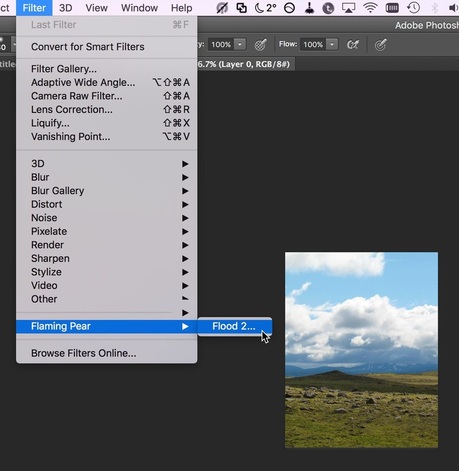
The plugin is now installed. To use it,
Open any RGB-mode image and select an area.
From the menus, choose the plugin you want to use.
If the Filter menu is greyed out, it's because your image is not in RGB mode. Change to RGB mode and it should work.
Home
Free trials
Products
Flood 2
Flexify 2
Melancholytron
India Ink
LunarCell
SuperBladePro
SolarCell
Glitterato
Mr Contrast
Aetherize
Hue and Cry
Freebies
Older
Purchase
Support